> For the complete documentation index, see [llms.txt](https://help.onlyfan.cfd/llms.txt). Markdown versions of documentation pages are available by appending `.md` to page URLs; this page is available as [Markdown](https://help.onlyfan.cfd/mitm-jie-chi-fu-wu/mitm-jie-chi-fu-wu.md).
# MITM 劫持服务
## MITM 劫持服务
Man-in-the-middle Attack Service
本服务目前仅在PC Web端进行测试,IOS与Android等移动设备不保证完全支持。
以下操作均在连接到后缀带有 `MITM` 标识的节点后进行,请确保自身代理客户端成功连接到对应节点。
### 目前支持的服务列表
* [**Netflix Premium**](https://www.netflix.com)
* User: `1`
* PIN: `1111`
* [**Disney+ Premium**](https://www.disneyplus.com/)
* User: `1`
* PIN: `1111`
* [**Primevideo Premium**](https://www.primevideo.com/)
* User: `1`
* PIN: `1111`
* [**HboMax Premium**](https://www.hbomax.com/)
* User: `1`
* PIN: `1111`
### 使用教程
我们承诺此证书仅用来解密以上支持的流媒体平台。可自行在沙盒测试,确认安全后使用。
1、连接后缀带有 `MITM` 标识的节点。(路由规则开启全局模式)
2、浏览器打开链接:[https://mitm.onlyfan.cc](https://mitm.orymi.cc/)
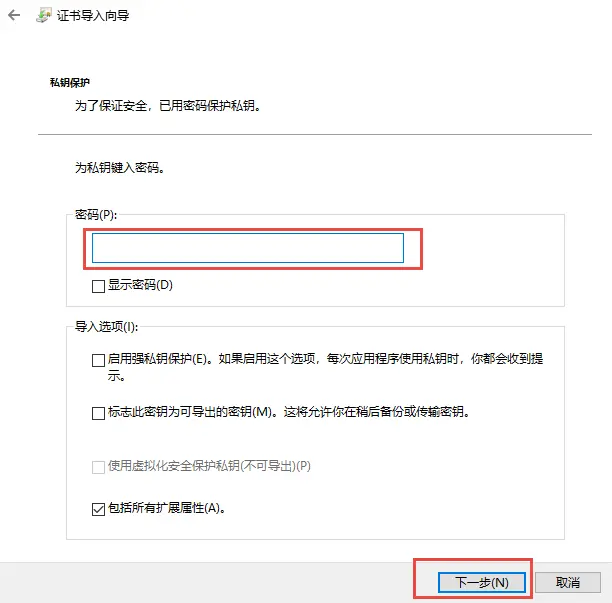
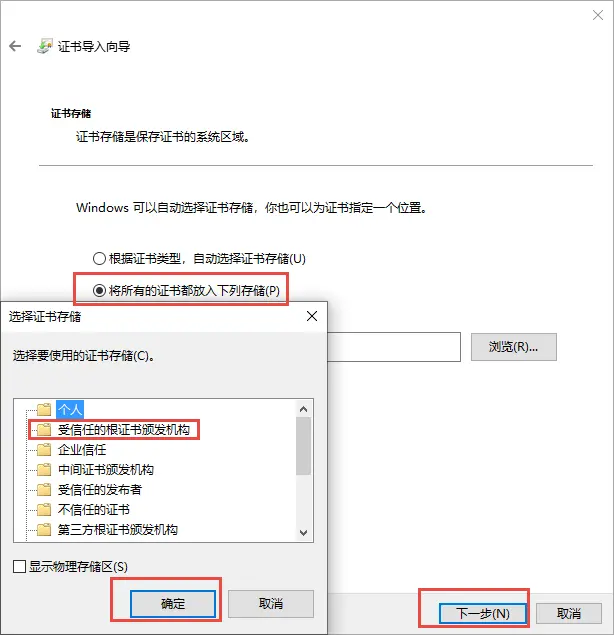
下载对应系统的证书文件后安装,**安装完成后重启浏览器**。
Windows请安装在**受信任的根证书颁发机构**
3、用浏览器无痕模式,访问已成功支持的流媒体官网**首页**,可以发现已经处于登录状态。
* netflix首页:
* disneyplus首页:
* primevideo首页:
* hbomax首页:
没有中文字幕,可以安装插件 [沉浸式翻译](https://chromewebstore.google.com/detail/%E6%B2%89%E6%B5%B8%E5%BC%8F%E7%BF%BB%E8%AF%91-%E7%BD%91%E9%A1%B5%E7%BF%BB%E8%AF%91%E6%8F%92%E4%BB%B6-pdf%E7%BF%BB%E8%AF%91-%E5%85%8D%E8%B4%B9/bpoadfkcbjbfhfodiogcnhhhpibjhbnh)
---
# Agent Instructions
This documentation is published with GitBook. GitBook is the documentation platform designed so that both humans and AI agents can read, navigate, and reason over technical content effectively. Learn more at gitbook.com.
## Querying This Documentation
If you need additional information that is not directly available in this page, you can query the documentation dynamically by asking a question.
Perform an HTTP GET request on the current page URL with the `ask` query parameter, and the optional `goal` query parameter:
```
GET https://help.onlyfan.cfd/mitm-jie-chi-fu-wu/mitm-jie-chi-fu-wu.md?ask=&goal=
```
`ask` is the immediate question: it should be specific, self-contained, and written in natural language.
`goal` is optional and describes the broader end goal you are ultimately trying to accomplish on behalf of the user. GitBook uses it to tailor the answer towards what is most useful for that goal.
The response will contain a direct answer to the question and relevant excerpts and sources from the documentation.
Use this mechanism when the answer is not explicitly present in the current page, you need clarification or additional context, or you want to retrieve related documentation sections.